Official mail becomes digital – Suomi.fi Messages replaces paper mail from several authorities
13.4.2026 06:57:00 EEST | Digi- ja väestötietovirasto | Press release
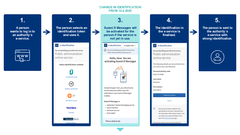
Official mail is becoming primarily digital. As of 14 April 2026, when you identify yourself in an authority’s e-service, you will be directed to activate Suomi.fi Messages. From then on, that is where you will receive mail from several public authorities. Suomi.fi Messages will replace official paper mail: you will not receive letters about the same matter later.
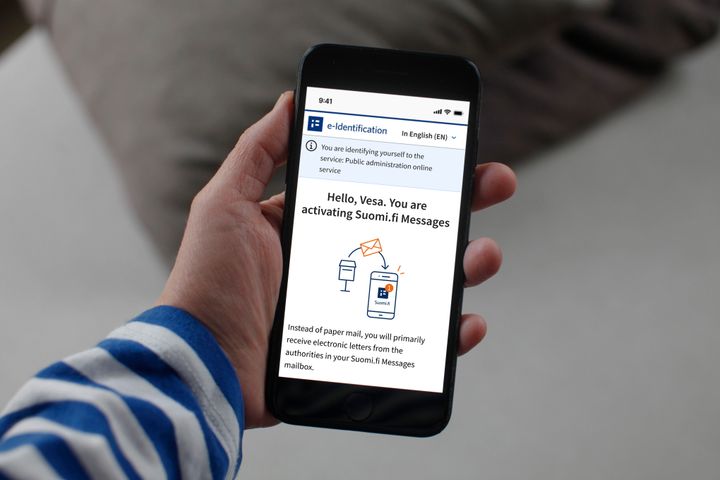
Suomi.fi Messages will be activated upon identification in the authorities’ e-services. The activation will require action from you and will not happen without you noticing. More than 2.6 million people already receive official mail in Suomi.fi Messages. In the future, the number of users is expected to rise significantly, as over four million people already handle their affairs with the authorities electronically.
How and for whom will Suomi.fi Messages be activated?
– Suomi.fi Messages will be activated for you if you are an adult, use the authorities’ e-services and have not yet activated the service. You’ll be directed to activate Suomi.fi Messages when you use strong identification in a public administration e-service with online banking codes, a mobile certificate or the electronic certificate on an ID card, says Project Manager Annette Hotari from the Digital and Population Data Services Agency.
In connection with the activation, you will need to enter your email address and verify it. This way, you will receive email notifications of new messages. After entering your email address, you can continue to identify normally and move to the e-service you were about to use.
The change only applies if you use official digital services
If you do not use the e-services of public administration, the change will not affect you, and you will continue to receive paper mail from authorities.
The change also does not apply to minors, persons under guardianship or persons with a valid continuing power of attorney.
You can still receive official mail in paper form
Hotari says that you can still receive official mail in paper form even if you handle your affairs with the authorities digitally.
– You can change the delivery method back to paper mail once you have activated Suomi.fi Messages. This can be done in the Suomi.fi Messages settings.
The choice to receive paper mail remains valid for at least one year. The next time you to identify yourself in an authority’s e-service after a year has passed, you will be directed to activate Suomi.fi Messages again. If you do not identify yourself in any service, you will continue to receive official mail in paper form even after the one-year deadline.
Mobile app is the easiest way to read incoming messages
Hotari points out that the Suomi.fi mobile application is the easiest way to read official mail.
– You can read messages sent by the authorities directly from the Suomi.fi application. The app also notifies you when a new message arrives. This way, the messages are easily accessible wherever you are.
It is important to always read new messages either in the Suomi.fi mobile application or by logging in at suomi.fi/messages.
– Never read a message through email or text message links. Suomi.fi Messages does not send text or WhatsApp messages to recipients. An email notification of the new message is sent, but it never contains a link for security reasons, Hotari says.
Keywords
Contacts
Annette HotariChief SpecialistDigi- ja väestötietovirasto / Myndigheten för digitalisering och befolkningsdata
Tel:0295535028annette.hotari@dvv.fiImages

Links
How to access your Suomi.fi Messages inbox
- You can read messages in the Suomi.fi mobile application or by logging in to the Suomi.fi Web Service and going to “Messages”.
- You can identify yourself with online banking codes, a mobile certificate or the electronic certificate on an ID card.
- You will receive an email notification whenever a new message arrives in Suomi.fi Messages.
- You will also receive notifications of incoming messages from the Suomi.fi mobile application if you have downloaded the app.
How to return to receiving paper mail:
- Activate Suomi.fi Messages when you identify yourself in an authority’s e-service. You cannot return to receiving paper mail before doing this.
- Go to Suomi.fi Messages at suomi.fi/messages.
- Identify yourself with online banking codes, a mobile certificate or the certificate on an ID card.
- In the menu, go to “Settings” and select “Stop using Suomi.fi Messages”.
If necessary, you can also get help from the Suomi.fi service counselling (tel. +358 295 000).
If you are using the Suomi.fi mobile application, please remember that
- simply uninstalling the application does not deactivate Suomi.fi Messages
- you must always deactivate the service in the Suomi.fi Messages settings.
How to use Suomi.fi Messages safely
- Always read the new message either in the Suomi.fi mobile application or by logging in at suomi.fi/messages. Do not click on links received by email or text message.
- Suomi.fi Messages email notifications never contain links. Suomi.fi does not send text, WhatsApp or other instant messages. Email notifications of messages received in Suomi.fi are sent from noreply@suomi.fi.
- The authorities will not rush you into doing anything. They never require you to act in a hurry, disclose information or click on links under pressure.
- If you suspect a scam, you can verify the authenticity of the message by logging in to Suomi.fi Messages at suomi.fi/messages or by opening the Suomi.fi application.
- Type the address in the address bar of the browser. Do not access the service through search engine results.
What is Suomi.fi Messages?
Suomi.fi Messages is a secure electronic mailbox that replaces official paper mail. The service is used by several authorities, and its use is constantly increasing. Incoming messages can be read using the Suomi.fi mobile application or by logging in to the Suomi.fi Web Service at suomi.fi. This way, you can read incoming mail wherever you are.
You can activate Suomi.fi Messages by downloading the Suomi.fi mobile application or by logging in at suomi.fi/messages. You can identify yourself with online banking codes, a mobile certificate or the electronic certificate on an ID card. When you activate Suomi.fi Messages, you will receive mail from several different authorities electronically as well.
Notifications of new messages are sent to the email address that you provide to the service. Users of the Suomi.fi mobile application will also receive notifications directly through the app.
In March 2026, there were already 2.6 million users of Suomi.fi Messages.
More information on Suomi.fi Messages: suomi.fi/en/messages
What does the transition to digital communication with authorities mean?
Legislation on the primacy of digital official mail enters into force on 14 April 2026. After that, official mail will primarily be delivered digitally to everyone who uses electronic services. Adults who log into authorities’ e-services are directed to activate Suomi.fi Messages during the identification process if they are not already using the service.
People who do not use digital services will continue to receive their official mail on paper, unless they choose otherwise. It is also possible to opt out of receiving electronic messages, after which messages will once again be sent by paper mail. If a person who has opted for paper mail continues using e-services, they will be directed to activate Suomi.fi Messages again the next time they identify themselves in an authority’s e-service after 365 days have passed.
The transition to digital mail will bring significant benefits. This will save tens of millions of euros per year for society and make everyday life easier for citizens. Letters sent by authorities will be available faster than before, found in one place and always available.
Once the legislation enters into force, official mail will primarily be delivered in Suomi.fi Messages to everyone who uses electronic services. In addition to Suomi.fi Messages, citizens may still receive official mail in other digital channels if any have been activated.
Later in 2026, we intend to make it possible to select another digital mail service for receiving official mail, as long as it meets the security and other requirements for official communication. Legislative and technical amendments required for freedom of choice are currently being prepared.
Read more: dvv.fi/en/digital-first-project
Digital and Population Data Services Agency (The Finnish Digital Agency)
Digital and Population Data Services Agency (The Finnish Digital Agency) serves people at different stages of life, promotes the smooth functioning and stability of Finnish society and secures the availability of reliable data.
The Digital and Population Data Services Agency sees to the maintenance of the Population Information System, which is the foundation for our society, and to the digitalisation of society.
The agency’s tasks include civil marriages, name and address changes, guardianship and administrative guardianship, maintenance of the Population Information System, development of solutions for electronic identification, as well as the development and maintenance of centralised support services for e-services. E-service support services include the Suomi.fi Web Service, electronic messages from authorities (Suomi.fi Messages) as well as authorisation for acting on behalf of another party (Suomi.fi e-Authorization).
The Digital and Population Data Services Agency leads the way, reforms society and supports citizens in their interaction with public administration. Our aim is to further promote the smooth functioning of Finnish society. Digitalisation is one important way to achieve this.
Alternative languages
Subscribe to releases from Digi- ja väestötietovirasto
Subscribe to all the latest releases from Digi- ja väestötietovirasto by registering your e-mail address below. You can unsubscribe at any time.
Latest releases from Digi- ja väestötietovirasto
Ny forskning: Förtroendet för det digitala samhället ökar – trots att de flesta finländare utsätts för digitala bedrägerier16.9.2026 06:00:00 EEST | Pressmeddelande
Finländarnas förtroende för den digitala världen har för första gången på fyra år vänt uppåt. Barometern för digital säkerhet 2026 som publicerades onsdagen den 16 september 2026 visar att nedgången i förtroendet har avstannat, att trygghetskänslan har stärkts och att medborgarna skyddar sig mer aktivt än tidigare.
Tuore tutkimus: Digitaalinen luottamus vahvistuu, vaikka suurin osa suomalaisista kohtaa digihuijauksia16.9.2026 06:00:00 EEST | Tiedote
Suomalaisten luottamus digitaaliseen maailmaan on kääntynyt parempaan suuntaan ensimmäistä kertaa neljään vuoteen. Keskiviikkona 16.9.2026 julkaistu Digiturvabarometri 2026 osoittaa, että luottamuksen lasku on pysähtynyt, turvallisuuden tunne on vahvistunut ja kansalaiset suojaavat itseään aiempaa aktiivisemmin.
Recent study: Trust in digitalisation strengthens even though most Finns encounter digital scams16.9.2026 06:00:00 EEST | Press release
Finns’ trust in the digital world has begun to improve for the first time in four years. The Digital Security Barometer 2026, published on Wednesday 16 September 2026, shows that the decline in trust has stopped, the sense of security has strengthened, and citizens now protect themselves more actively.
Välkommen att följa Sujuva Suomi -jubileumssändningen den 8.9: Digitaliseringens fenomen igår, idag och i framtiden – kommer artificiell intelligens fortfarande att dominera digitaliseringsdebatten om fem år?4.9.2026 10:06:41 EEST | Pressmeddelande
Välkommen att följa Sujuva Suomi -diskussionen den 8.9.2026 kl. 14.00–15.30. Myndigheten för digitalisering och befolkningsdata inledde diskussionsserien för fem år sedan. Målet var att skapa en mångsidig, mångstämmig och öppen diskussion om digitaliseringens fenomen.
Antalet användare av Suomi.fi-meddelanden översteg fyra miljoner – den digitala myndighetsposten etableras snabbt i finländarnas vardag28.8.2026 09:57:42 EEST | Pressmeddelande
Antalet användare av Suomi.fi-meddelanden har överskridit fyra miljoner. Sedan lagstiftningen om prioritering av digital myndighetskommunikation trädde i kraft har användningen av tjänsten ökat snabbt, och e-post har blivit ett vanligt sätt för allt fler finländare att ta emot myndighetsmeddelanden.
In our pressroom you can read all our latest releases, find our press contacts, images, documents and other relevant information about us.
Visit our pressroom